
What we wanted to make
You print a QR code on a flyer or a business card, and one day it stops working. Some QR makers don't put your page's address into the code. They put in one of their own, which forwards to yours. If that forwarding ever stops, every sheet you printed is dead.
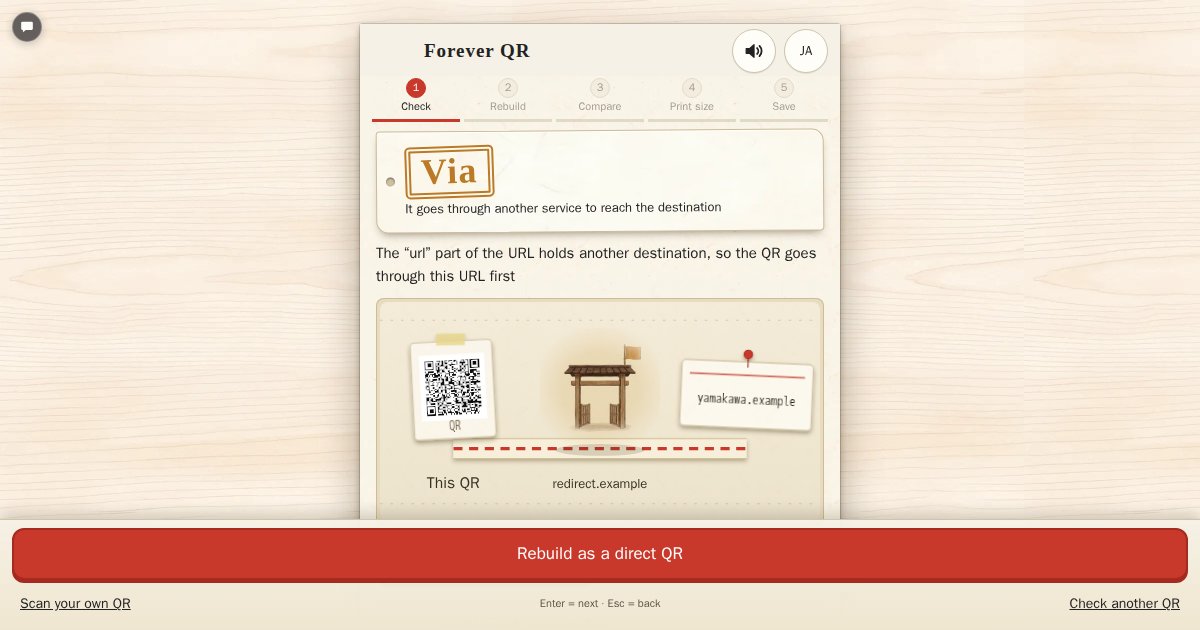
We wanted something that tells you, in about ten seconds, where a QR code actually goes and what it passes through on the way. Do it before you print, or after, if it's already too late for that. Scan a code and the route appears as a picture: a straight road to the page, or a road with a gate in the middle. If there is a gate, you can rebuild the code without it on the spot, choose a print size, and take the new code with you.
Can your QR code be switched off?
What we cared about most: saying "Unknown" when we don't know
The app sends nothing anywhere. Not the image, not the contents, not the link. The price of that promise is that we can't open a link and follow it. All we have to go on is a list of known forwarding services and the shape of the address, and that will sometimes be wrong.
So there are three answers: "Direct", "Via", and "Unknown". When a short link gives no hint of where it ends up, the far end of the road is drawn in fog, with a note that we haven't looked past that point. We don't judge whether the destination is safe either. The app shows what a code passes through and what is written in it, and stops there.
The numbers follow the same rule.
- A rebuilt code is shown side by side with the original. Putting the full address in the code can make the squares finer. We show that difference as it is, in the size of the grid and the rough reading distance, even when it doesn't flatter the new code.
- "Try reading it at this size" is a real attempt. The code is shrunk and blurred for the size and distance you chose, and that image goes to the same reader the camera uses. The code you see in the picture is the exact image the reader was given.
- What stays on your device is only what appears on a saved card. The verdict, the domain name, the date, the size and distance you tried, the kind of paper, and whether you removed measurement tags. Full addresses and Wi-Fi details are never kept.
The hard part: keeping the numbers in agreement
Check, rebuild, compare, pick a print size, try it, save. Six screens in a row means the same number turns up again and again, and that is where we kept tripping.
- The compare screen worked out distance for a 2 cm code and the print-size screen for 3 cm, so one code had two different answers. We stopped calculating per screen. Every screen now reads from a single value, and automated tests look for disagreements.
- We added a 25 cm option for posters only. Pick 25 cm, switch to a business card, and the app saved a 25 cm code for a business card. Now, switching paper moves you to a size that fits, with a short note: "The business card can't fit 25 cm, so we set it to 3 cm".
- When you rebuilt a code that had no measurement tags, the word "null" appeared on the screen. Every check by the people who built it had passed. It was found by a cold run, someone using the app with no background, going only by what was on the screen. Since then, the text of every screen we pass through is checked.
- The "try reading" picture looked like a blurred diagram no matter how many frames and how much grain we added. After two attempts at polish changed nothing, we changed the approach: the picture is now the whole sheet you chose, lying on a desk, photographed from a distance.
- The shelf of cards you had checked first sat below the samples, where nobody saw it on a second visit. If you have cards, the shelf now comes first.
We'd love to hear from you
Honest reactions help the most. Even one answer is useful.
- Did you scan a code of your own, from a business card, a flyer, or a shop counter? Once you saw the result, was it clear what to do next?
- Were any of the words hard to follow: "Via", "gate", "measurement tags", the fog?
- Did the distance in "Try reading it at this size" match what happened with real paper and your own phone? We have only been able to test it inside the screen.
- Next time you print a QR code, would you open this again? What would make you?
If you catch yourself looking at the code by the till and wondering what it passes through, we've done our job.